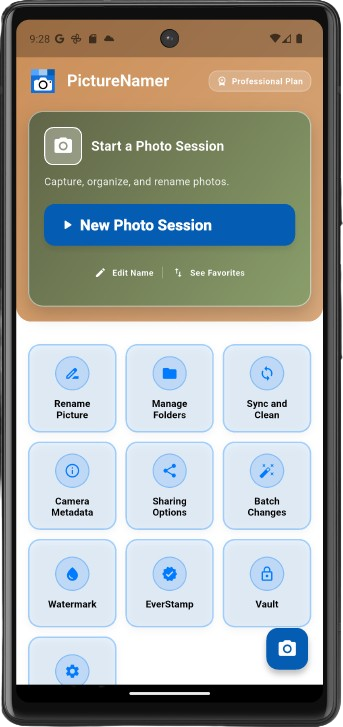
The smart way to manage, document, protect, and deliver your photos from the moment they are captured.
Free to start · 14-day Pro trial · No credit card required


Free to start • 14-day Pro trial • Built for real photo workflows
Start organized.
Keep every photo where it belongs.
Add privacy, proof, and context.
Share with confidence.
Too many photos. No structure. Random file names. Hours wasted trying to find what matters.
Hundreds of images with no system, no context, and no clear place to start.
IMG_4829.jpg does not help when you need to find a job, listing, meal, or memory later.
Sorting, labeling, and reporting often takes longer than capturing the photos themselves.
PictureNamer fixes this — before it becomes a problem.
One app. Multiple workflows. From job sites to listings, content creation to travel memories.
Organize job site photos by project, quote, or service call.
See how it works →Track listings, inspections, renovations, and property updates.
See how it works →Keep content searchable, structured, and ready to reuse.
See how it works →Organize memories by experience, location, and moment.
See how it works →Keep important visual records organized and easy to reference.
See how it works →Track ideas, works in progress, proofs, and finished creations.
See how it works →Explore focused guides for the most common ways people use PictureNamer.
Keep service calls, quotes, repairs, and completion photos organized by job.
For reportsTurn project photos into clear visual records you can review, share, and deliver.
For searchReplace random file names with names that make photos easier to find later.
For brandingAdd text or logo watermarks to protect, brand, and identify your work.
For privacyKeep sensitive folders and private proof photos out of sight.
For cleanupFind duplicate, similar, and large photos so your library stays useful.
Start organized, stay organized, and deliver your photos with more context and confidence.
Create structure before you shoot so every photo lands where it belongs.
Organize images into clear, searchable folders by project, event, or place.
Replace random file names with meaningful titles you can actually find later.
Add visible tags and details directly onto images for sharing and searchability.
Protect your work with text or logo watermarks, including saved presets.
Export clean PDF reports with images, notes, and descriptions.
Verify authenticity with digital fingerprinting and certificate support.
Hide and protect sensitive folders with secure PIN-based access.
Review storage, duplicates, and clutter so your photo library stays efficient.
A contractor needed a faster way to capture job photos, organize them by project, and turn them into quote-ready documentation.
Instead of spending hours sorting and labeling images later, the idea was simple:
Organize everything from the moment you take the photo.
That idea became PictureNamer.
Common questions about PictureNamer features, plans, and how it works.

Yes. You can start with the free version and upgrade later for advanced tools and workflows. Our model offers FREE users a great set of tools supported by ads. You can upgrade at any time to access additional features. You can even try our Pro Plan for FREE for 14 days to take it for a test drive.
Yes. You can create folders first, then import photos from your device gallery into those folders. PictureNamer sets up a separate folder system for your photos. You can have them in both the PN gallery and your device gallery, or manage where you need them. You can keep these better organized and remove them from your expensive platform storage fees. You can even create your own backup to the service of your choice, or other storage partners you may use and have installed on your device. This can also help keep personal images separate from work images.
A New Photo Session lets you create a folder before you start shooting, so new photos are saved into the right place automatically. When you start a vacation, or go to a new job site you can easily create a new folder. After the folder is set up, your camera can launch and all photos can be saved into that photo session. You can adjust how long that stays on or direct it in the settings to change, should you create a new folder.
Image Tags let you add visible tags and details directly to your photo so important context stays attached when shared. This is helpful when metadata may be stripped by social media platforms, email tools, or other sharing services. Image Tags adds a small strip in dark or light tones to the image. This is great for embedding keywords, descriptions, locations, or titles. No more worries about social media stripping your searchable content.
Yes. You can create and export PDF photo reports for projects, inspections, quotes, or records. When in a folder, select the print icon at the top of the page. This will generate a preview of the PDF with all the photos in that folder. You can provide a title, description, and change some design features. This is a great tool for contractors, inspectors, AirBnB reports, or whatever your needs. PictureNamer is designed to help you be more efficient and organized.
To help support our development and keep great features available to FREE users, we run two ad programs. The first is a small banner ad at the bottom of the screen on many pages. The second is an interstitial ad that runs after a few functions, staying off for 15 minutes after first viewed. Please feel free to click and support our ad partners when you can.
PictureNamer includes vault protection and private folder controls. You can create Vault folders that require a PIN to access. An extra feature is STEALTH mode — you can actually hide the Vault folders from showing, and even remove the Vault menu item from the home screen entirely. Ultimately, you can move the folders you want to secure from your default phone gallery to a private PIN-controlled area. This feature is not available to FREE plan users.
Absolutely! For Pro plan users, this gives you the ability to watermark your images with a text watermark or an image watermark like a logo. There is an interactive preview to see your creation. You can save the watermark as a template to apply to other pictures. With our batch tool, you can apply the watermark to an entire folder of images, helping you protect your work or identify images with addresses, notes, or whatever you need.
Download PictureNamer and take control of your photos today.